
An outsourced IT help desk is a third-party team that handles your employees’ technical support requests, from password resets to software and hardware issues. Costs usually follow per-user, per-ticket or per-agent pricing, and an SLA defines how fast issues are answered and fixed. Compare providers on pricing clarity, SLA terms, security controls and escalation paths.
Slow Tickets, Stretched Staff: Why Help Desks Get Outsourced
A help desk is the front door of IT. When it is slow, every department feels it, and your best technical people lose hours to password resets and printer problems.
IT help desk outsourcing moves that daily load to a dedicated support team, usually at a predictable cost. This guide explains what you will pay, which SLA terms matter and how to compare providers, so you can choose with clear numbers instead of sales promises.
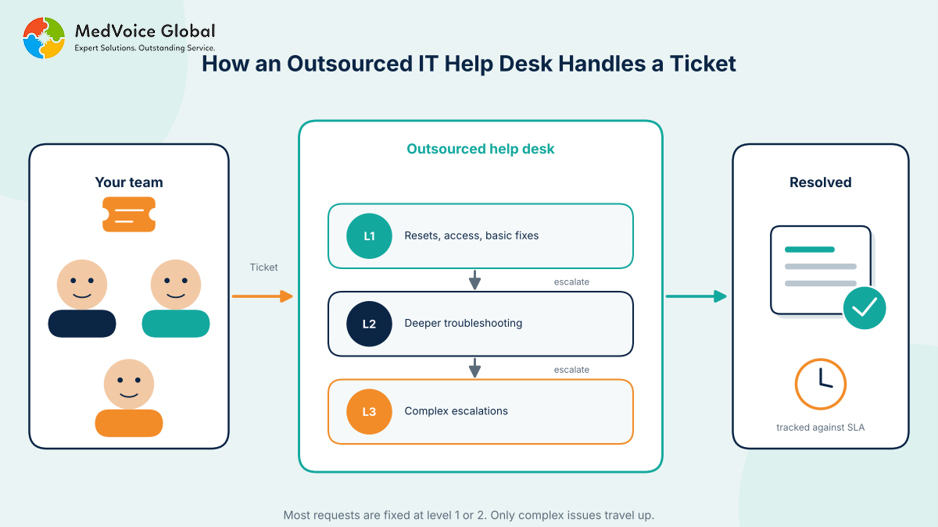
Figure 1: How a ticket moves through the support levels of an outsourced help desk.
Key takeaways
- Pricing comes in four common forms: per ticket, per user, per agent hour and dedicated agent.
- The headline rate is rarely the full cost. Check setup, overage, licensing and exit fees.
- A useful SLA sets both response and resolution targets, by ticket priority.
- Compare providers on security, escalation paths and reporting, not on rate alone.
What Is an Outsourced IT Help Desk?
An outsourced IT help desk is a service where an external provider answers and resolves your employees’ technical support requests. Level 1 agents handle common issues such as password resets, level 2 handles deeper troubleshooting, and complex problems are escalated to specialists at the provider or in your own team.
- Level 1: password resets, account access and basic software or device issues.
- Level 2: configuration problems, software errors and hardware troubleshooting.
- Level 3: complex escalations, such as infrastructure and application problems.
What Do Help Desk Support Services Include?
Help desk support services typically cover ticket intake, remote troubleshooting, account and access management, software and hardware support, escalation and reporting. Higher tiers add 24/7 monitoring, proactive maintenance and compliance support. Always confirm what the base price includes, because add-ons change the total cost quickly.
- Ticket intake by phone, email, chat or a support portal.
- Remote troubleshooting and account or password resets.
- Software installs, device setup and hardware support.
- Escalation to level 2 or level 3 specialists.
- Reports on ticket volume, response times and resolution times.
Outsourced Help Desk Cost: What Will You Actually Pay?
Outsourced help desk pricing usually follows one of four models: per ticket, per user per month, per agent hour or a dedicated agent per month. Published 2026 guides cite about $6 to $40 per ticket and $8 to $60 per agent hour, with offshore teams and simple requests at the low end.
| Pricing model | Published range | What to know |
| Per ticket | About $6 to $40 by support level in one guide, $1 to $20 in another | Suits uneven volume. Check that quality is not traded for fast closes. |
| Per user per month | $80 to $150 onshore and $20 to $50 offshore for help desk only. $100 to $250 for broad managed IT support | Predictable, but cost grows with headcount. |
| Per agent hour | Offshore $8 to $18, nearshore $20 to $30, onshore $35 to $60 | Suits varied complexity. Monitor productivity. |
| Dedicated agent per month | Offshore about $1,300 to $2,900, onshore about $3,500 to $4,500 or more | Consistent coverage. Needs firm SLAs. |
These ranges come from vendor-authored guides by KDCI, Digital Minds BPO and Panat Experts. They disagree in places, so use them to sanity-check quotes, not as quotes.
Price also moves with support level. One 2026 guide puts level 1 tickets at $6 to $13, level 2 at $22 to $28 and level 3 at $40 or more. Other cost drivers include:
- Agent location, with onshore teams costing the most.
- Support hours, because 24/7 coverage costs more than business hours.
- Compliance needs such as HIPAA or PCI DSS.
- Ticket volume and the channels you support.
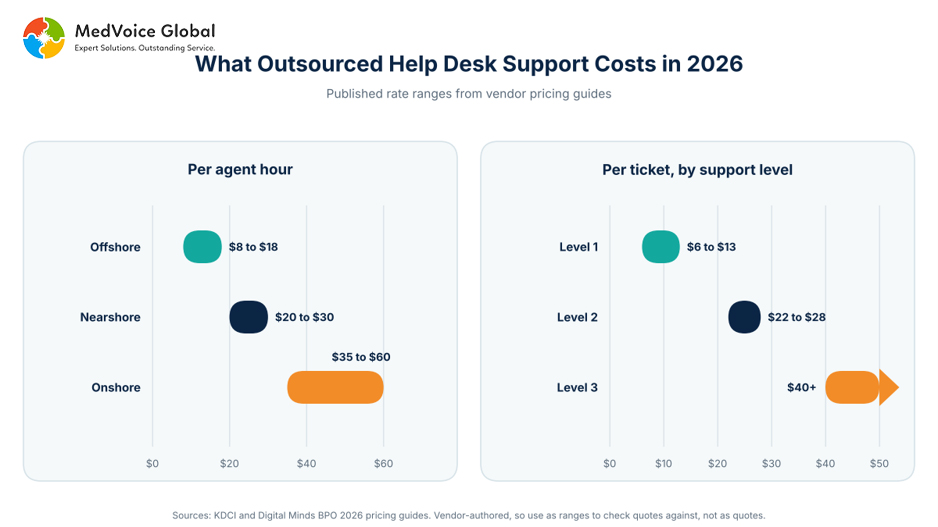
Figure 2: Published 2026 rate ranges per agent hour and per ticket.
The headline rate is rarely the full bill. One guide lists these extras to check for:
- Setup and onboarding: $1,500 to $5,000 one time in some contracts.
- Overage and after-hours: some contracts charge 1.5 to 2 times the base rate.
- Software licensing: tools billed on top of a low headline rate.
- Exit fees: one to three months of fees in some agreements.
Now compare against hiring. Panat Experts estimates an entry-level in-house technician at $45,000 to $65,000 in salary alone, with fully loaded costs approaching $80,000 or more, and that one person covers only business hours. This in-house vs outsourced IT staffing cost breakdown walks through the math for small businesses.
For example, MedVoice Global’s IT help desk outsourcing covers level 1 and level 2 support, including remote troubleshooting, ticket management, software and system setup and hardware support. The company states typical annual savings of 40 to 60% and onboarding for most clients within 7 to 14 days.
What Should an IT Help Desk SLA Include?
An IT help desk SLA is a written agreement that sets how fast a provider must respond to and resolve tickets, by priority, and how performance is measured and reported. A useful SLA covers both response time and resolution time, because a fast reply without a fix does not help your staff.
| Priority | Typical meaning | What to define in the SLA |
| Critical | Business stopped or many users blocked | Response and resolution targets, 24/7 coverage, escalation contacts |
| High | Key function degraded or a key user blocked | Response and resolution targets, escalation trigger |
| Medium | One user affected, a workaround exists | Response and resolution targets in business hours |
| Low | Requests and how-to questions | Response targets, batching rules, review cycle |
No single response-time number fits every business, so set targets by priority and by what an hour of downtime costs you. Then make sure the contract tracks these measures:
- First response time and resolution time, by priority.
- First contact resolution, the share of issues fixed on the first interaction.
- Customer satisfaction scores from your own staff.
- Escalation rules, reporting frequency and the remedy when targets are missed.
How Do You Choose an IT Help Desk Provider?
Choose a provider by comparing five things: transparent pricing, SLA terms that cover response and resolution, security and compliance controls, clear escalation paths and regular reporting. Ask for itemized quotes and sample reports before signing, and start with a short pilot if you can.
- Pricing: can the provider itemize setup, overage, licensing and exit fees?
- SLAs: do targets cover resolution time, not only response time?
- Security: which access controls and audit trails protect your data? Regulated teams should review HIPAA compliant outsourcing requirements first.
- Escalation: who owns level 3 problems, such as network management and infrastructure issues?
- Reporting: which metrics are reported, and how often?
- Coverage: do support hours match when your staff actually work?
ss
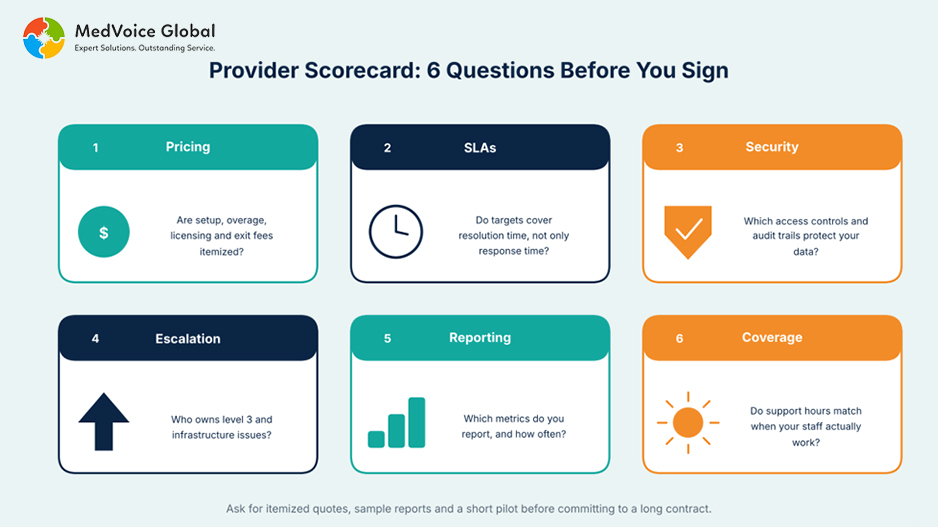
Figure 3: Six questions to ask any provider before you sign.
When Does Outsourcing the Help Desk Make Sense?
Outsourcing makes sense when ticket volume outgrows your IT staff, when you need coverage beyond business hours, or when a full in-house team costs more than the service you actually use. It fits less well when you need on-site hands every day or run highly custom internal systems.
This breakeven guide for switching to outsourced IT helps size the decision. If you need one embedded technician instead of a shared queue, IT staffing services may fit better.
Which Provider Should You Choose? A Simple Decision Path
Start with your ticket volume, support hours and compliance needs. Then shortlist providers whose pricing model fits your volume pattern, whose SLA covers resolution as well as response, and who can show reporting and security controls. A short pilot confirms the fit before you commit to a long contract.
MedVoice Global can support this path with level 1 and level 2 helpdesk support, 24/7 monitoring and scalable teams, as described on its IT outsourcing page. Share your ticket volume and support hours to get a scoped recommendation.
Ready to compare real numbers? Share your user count and ticket volume, and a specialist will outline a fitting plan. Get Started or call +1 972 942-0900.
Frequently Asked Questions
What is the difference between a help desk and a service desk?
A help desk focuses on fixing individual technical issues and requests. A service desk is broader and manages IT services more formally, including incidents, requests, changes and knowledge, often using ITIL practices. Many providers use the terms loosely, so check what a quote actually covers.
How long does it take to switch to an outsourced help desk?
Timelines depend on scope, tools and how much documentation you have. One vendor guide notes that new agents need roughly 30 to 60 days to reach full productivity. Ask any provider for a written onboarding plan, a named lead and the date targets begin to apply.
Is an outsourced help desk secure for sensitive data?
Security depends on the provider’s controls. Ask about access controls, encryption, audit trails and staff screening, and confirm compliance support such as HIPAA if you handle health data. Put security duties and breach notification in the contract, not only in the sales deck.
Can a small business use an outsourced help desk?
Yes. Small teams often benefit most, because they rarely have staff to cover every shift or specialize in every system. Per-user or per-ticket pricing can keep spend aligned with real need. Start with business-hours coverage and add after-hours support when ticket data shows demand.
What are the signs your current help desk is failing?
Common signs include tickets that sit unanswered, the same issue returning, no reporting on response or resolution times, IT staff buried in routine requests, and employees working around IT instead of asking for help. Track these for a month before you compare providers.
Sources
KDCI, Cost to Outsource Help Desk Services in 2026 (hourly, seat and per-ticket ranges)
Digital Minds BPO, Outsourced Help Desk Pricing in 2026 (tier pricing, hidden fees, onboarding ramp-up)
Panat Experts, Outsourced IT Support Cost (per-user ranges and in-house comparison)
MedVoice Global, IT Outsourcing Services (company-stated services, savings and onboarding)